How to Report a Property Listing?
2 min readLast updated: 2026-03-25
If you encounter a violating listing or an unresponsive broker, Raghdan platform allows you to submit a report directly from the listing page. Reports are reviewed by the Raghdan team to ensure listing quality and user protection.
Where is the Report button?

The Report button appears at the top of the listing page in the same row as the Share and Street View buttons. The icon is shaped like a flag.
Report Window
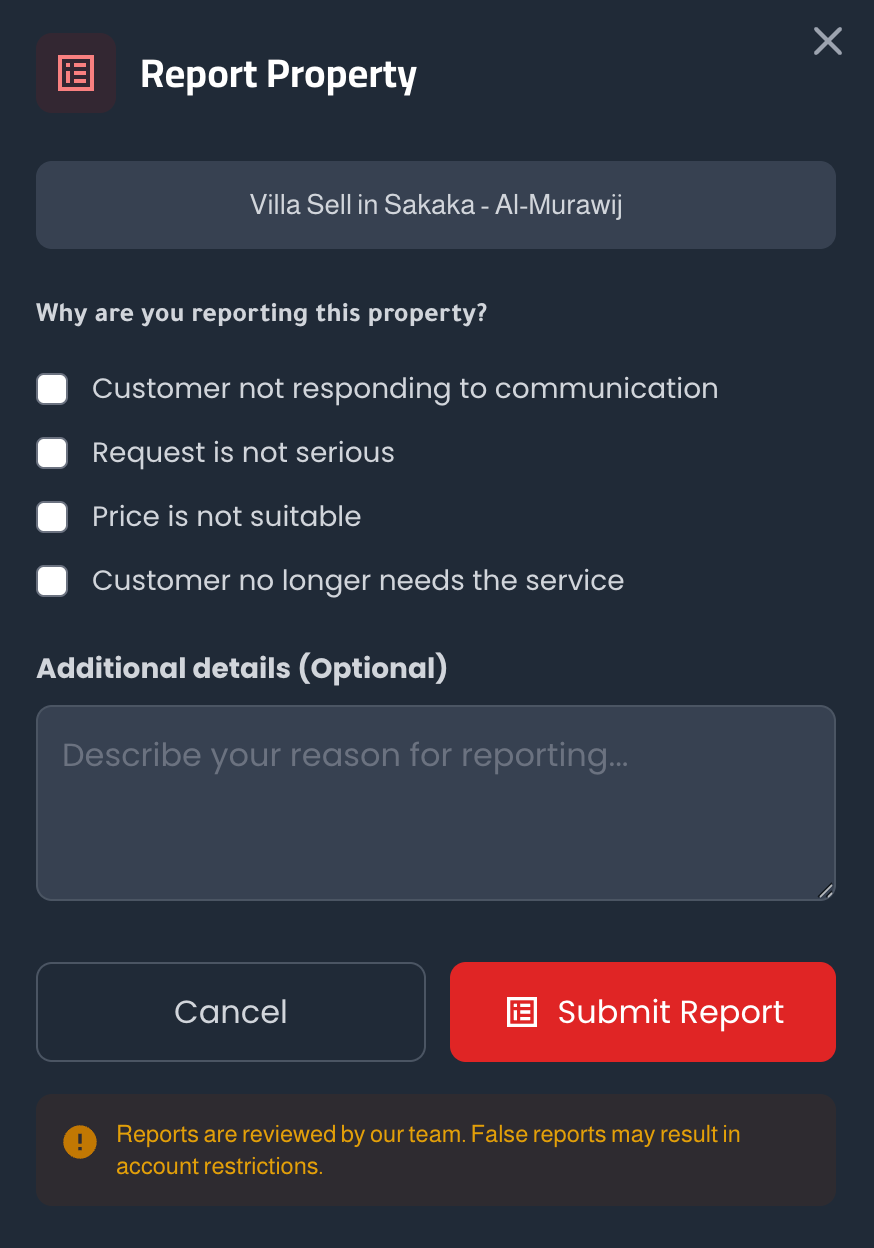
When you click the Report button, a window opens containing:
- Property name being reported — shown automatically
- Report reasons — choose one or more:
- Client is not responding to communication
- Request is not serious
- Price is not suitable
- Client no longer needs the service
- Additional details — optional field to explain the report in detail
- "Submit Report" button — to confirm the report
Steps to Submit a Report
- 1Open the property listing — Click on the listing you want to report
- 2Click the Report icon — Flag shape in the top corner next to the photos
- 3Choose report reason — Select one or more reasons from the list
- 4Add additional details — Write an explanation if you wish (optional)
- 5Click "Submit Report" — to confirm sending the report
What happens after reporting?
- The report is sent directly to the real estate broker responsible for the listing to contact you and resolve the issue.
- If the issue is not resolved, a violation is recorded against the broker which affects their rating and record within the platform.
- The Raghdan team reviews all reports to ensure quality.
Important Notes
False reports may lead to restrictions on your account. Use the reporting feature responsibly.
Before submitting a report, try contacting the broker first. The delay in response may be due to a temporary circumstance.